
LED dimming refers to adjusting the brightness level of a lighting device by controlling its power output.
LED调光与传统照明调光方法不同。传统照明通过降低电压来调光,而LED调光则采用更智能的方法,例如脉宽调制调光、后沿调光或相位切割调光。
Dimming LEDs creates a comfortable ambiance and brighter environments.
When dimming LED brightness, the thermal stress on internal LED chips decreases, reducing wear and tear.
This effectively extends fixture lifespan to approximately 25,000–50,000 hours or longer. Lowering brightness through LED dimming also saves on maintenance and replacement costs.
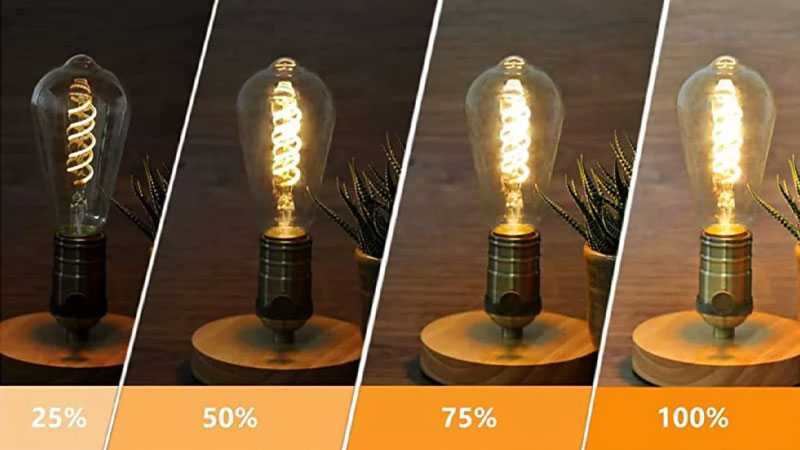
LED dimming enables flexible, tailored lighting solutions based on specific needs and scenarios, significantly reducing energy consumption.
For instance, in daytime office settings, adjust brightness for a bright, productive workspace. At night, dim lights while watching movies at home create a warm, cozy ambiance.
Ever feel eye strain from overly bright lighting while reading at home? LED dimming solves this. It automatically adjusts brightness based on weather and time, reducing glare intensity to minimize eye fatigue and create a comfortable reading environment.
LED dimming limits maximum brightness, preventing damage from excessive light output.
LED dimming offers superior adaptability and functionality for lighting fixtures equipped with advanced lighting systems. These fixtures can synchronize with smart home products, enabling scheduled dimming via voice control and other features.
When paired with modern dimmers, LED dimming automatically adjusts brightness levels in complex lighting environments, delivering significant convenience.
LED dimming is crucial for the visibility of LED displays. When images on an LED display are excessively bright, viewers struggle to discern the intended subject.
In such cases, LED dimming can reduce brightness in darker areas of the image, creating stark contrast with brighter sections. This
highlights the subject, making it immediately clear to viewers and significantly improving visibility.
LED dimming allows adjusting brightness levels for diverse application scenarios. For instance, when using outdoor LED screens under intense sunlight, increasing brightness ensures clear visibility.
Indoor LED screens require lower brightness levels, enabling energy savings through reduced settings. Over time, this not only extends the display’s lifespan but also conserves energy, significantly reducing electricity costs.
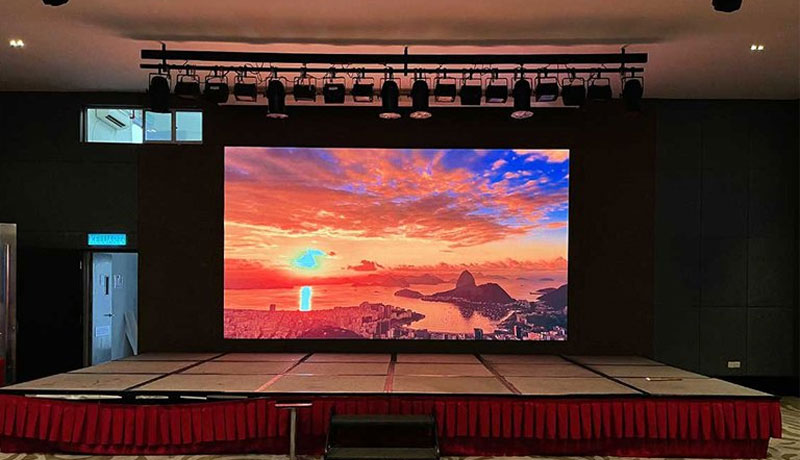
LED dimming is crucial for improving display quality and color performance. Precise brightness control reveals richer details and vibrant hues, making visuals more vivid and refined.
Proper LED dimming ensures uniform brightness distribution across all display areas, enhancing LED screens brightness consistency for superior image quality that truly catches the eye.
Compared to undimmed displays, dimmable LED screens reveal finer details while significantly restoring color saturation in darker areas, minimizing color discrepancies.
Now we come to the part you’re most interested in: how to dim LEDs. Below are several dimming methods to help you. Let’s explore them together.
Also known as forward phase cut dimming or bidirectional thyristor dimming, this traditional method was originally designed for incandescent and halogen lamps. While it can be applied to some LEDs, it’s less common today.
Bidirectional triac dimmers typically employ leading edge dimming to regulate lighting fixtures. This method reduces the current received by the fixture by cutting off the initial portion of the AC waveform, making it suitable for most residential applications.
However, its primary drawback is that lighting fixtures often flicker or emit a buzzing sound, caused by the frequency cutting of the AC power supply.
If you encounter such issues during dimming, consider replacing the dimmer with a higher-quality model.
Also known as ELV (Electronic Low Voltage) dimming, trailing-edge dimming is compatible with most modern LED lights on the market. It is suitable for most homes and commercial spaces, making it one of the best dimming methods for LED lighting systems.
Unlike leading-edge dimming, which cuts off the front portion of the AC waveform, trailing-edge dimming interrupts the waveform at its trailing edge.
This reduces the current received by the LED, resulting in exceptionally smooth and seamless dimming without any flickering.
For dimming household lighting, we recommend prioritizing trailing-edge dimming. It eliminates flickering and other issues, making it your ideal choice.
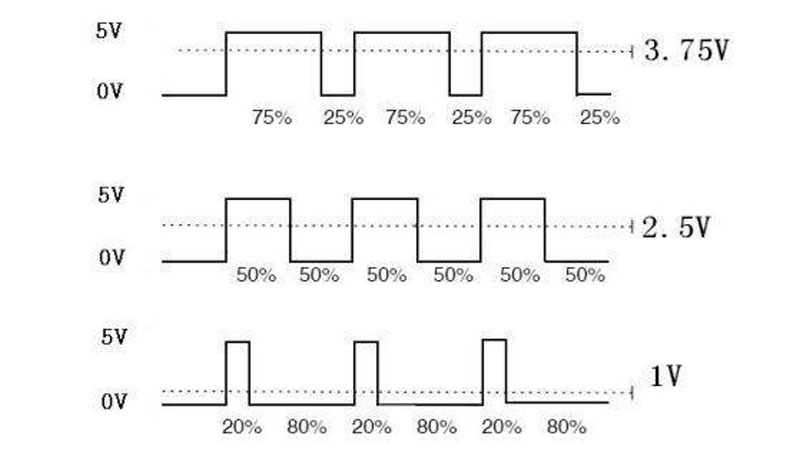
Since the human eye’s visual frequency is approximately 60 frames per second, PWM dimming rapidly switches LED lights on and off at an ultra-fine level. This causes the lights to flicker at an extremely high frequency.
Our brains automatically fill in the gaps in the image, making the dimming process feel incredibly fast and smooth. It is suitable for smart systems and certain color changing LED strips.
The sole drawback of PWM dimming is its requirement for more complex control circuits. Additionally, at lower dimming levels, LEDs may emit noise that can be distracting.
When ultra-fast LED dimming is essential, PWM dimming proves the superior choice.
DALI dimming, also known as the Digital Addressable Lighting Interface, is a digital communication protocol that allows individual addressing and control of each LED light within an illumination system.
This enables precise brightness and color control for every LED, making it an excellent choice for commercial applications such as smart buildings, automation systems, and IoT integration.
However, implementing DALI dimming requires upfront investment in specialized controllers and wiring to achieve its optimal performance. Before selecting a dimming method, carefully consider your budget and the specific application environment.
0-10V dimming adjusts light intensity by varying the voltage between 0-10V. Zero volts indicates a complete shutdown, while 10V represents maximum brightness. This method precisely controls light output, delivering smooth, natural dimming transitions.
Compared to digital communication protocols, 0-10V dimming offers a more economical price point, making it suitable for most large offices, warehouses, and industrial environments.
However, its dimming range is somewhat limited, and its dimming precision is not as high as DALI dimming.
Select the dimming method based on your specific application requirements. If high dimming precision isn’t essential and a cost-effective solution is needed, prioritize 0-10V dimming.
Wireless smart dimming transmits dimming signals from smartphones, tablets, or smart home devices to lighting fixtures via WiFi, Zigbee, Bluetooth, or similar technologies. This enables remote control of brightness, color temperature, and scene settings.
For example, you can instruct your voice assistant: “Hey Alexa, dim the living room lights to 40%.” The lights will automatically adjust without manual intervention, offering significant convenience.
If you seek a more convenient dimming solution, wireless smart dimming should be your top choice.
Having understood the LED dimming methods above, how can you implement dimming for LED displays? Below, I’ll detail three approaches: brightness adjustment, pixel control, and pixel-by-pixel calibration.
Automatic Brightness Adjustment: This feature employs optical sensors to detect ambient light levels. The sensors convert this information into electrical signals sent to the controller.
Upon receiving these signals, the controller determines the necessary brightness adjustments and transmits commands to the driver circuitry. This process optimizes the display’s brightness, delivering superior visual performance.
If you choose automatic adjustment for your LED display’s brightness, its automated function ensures the display consistently operates within a reasonable brightness range, delivering clearer and more refined image quality.
Manual Brightness Adjustment: Manually adjusting the LED display’s brightness is actually done through software. On the software interface, you set the brightness level according to your actual needs.
Most control software supports 256 adjustable brightness levels. Once configured, the software modifies the PWM duty cycle of the display driver. PWM precisely controls the illumination duration of LED chips, thereby achieving brightness adjustments.
PWM Dimming: PWM dimming for LED displays primarily exploits the human eye’s persistence of vision. It achieves grayscale control by altering the pulse width and refresh rate of the signal.
As long as the signal refresh rate is sufficiently high, the human eye cannot perceive pixel flickering on the display, enabling precise control over the LED display’s grayscale levels (i.e., the number of brightness steps from darkest to brightest).
This method is suitable for digital control, and nearly all LED displays on the market today employ PWM dimming to manage their grayscale levels.
Analog Dimming (Current Dimming): Analog dimming primarily controls pixel brightness by adjusting the current flowing through the LED display, thereby altering the display’s overall brightness.
Typically, most LED IC chips maintain a current of around 20mA during continuous operation. However, when red LED chips reach saturation, their brightness ceases to change even as external current increases.
Unlike red chips, the brightness of other LED chips generally increases proportionally with current.
With significant advancements in LED display performance, analog dimming is no longer optimal for achieving rapid and precise brightness adjustments. For pixel-level dimming control, PWM dimming is the recommended approach.
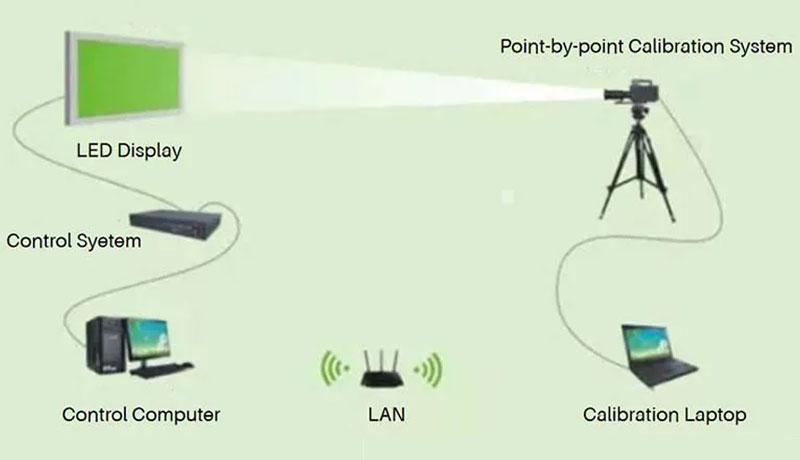
Pixel-by-pixel Novastar calibration primarily involves measuring the brightness and color accuracy of each red, green, and blue pixel on the LED display. After collecting this data, the system generates a correction coefficient for each pixel.
These coefficients are then transmitted to the display’s control system, which applies them to the pixels to enhance brightness uniformity and color fidelity across the LED display.
To address color variations and brightness inconsistencies in LED displays, consider implementing pixel-by-pixel calibration for dimming. This technique delivers naturally soft lighting and exceptionally accurate color reproduction.
If you experience persistent LED screen flickering or the lights are flickering during dimming, it may be caused by incompatibility between the dimmer and LED lights, unstable power supply, or non-dimmable drivers.
To resolve this, replace the dimmer with one compatible with your LED lights (e.g., trailing edge dimmer), check for loose wiring connections, or replace the driver with one matching the dimming technology.
If your fixture emits a humming sound, it’s likely due to using a dimmer incompatible with the LED display driver. Ensure your dimmer matches the driver specifications. We recommend using a trailing edge dimmer, which is compatible with most LED lights.
The LED driver primarily regulates the power supply to the entire fixture. Using a low-quality driver or one not specifically designed for dimming can cause issues like uneven brightness and reduced lifespan.
Ensure your chosen LED driver supports dimming functionality.
You may encounter situations where dimming multiple LED lights fails to adjust their brightness or causes them to remain off entirely.
This occurs because the purchased LED lights are not dimmable. Always verify the label during purchase, as some LED lights are dimmable while others are not.
Glare occurs when LED lights are excessively bright, improperly aligned, or use incorrect beam angles.
To mitigate this, reposition the lights for better light dispersion, or install diffusers and frosted covers to soften the light and reduce the stinging sensation glare causes to the eyes.
The above covers the role of LED dimming in lighting fixtures and LED displays, along with solutions for common issues. We hope this information proves helpful.
No. The refresh rate of an LED display is primarily determined by its internal driver chips and is unaffected by LED dimming.
Pre-factory LED dimming for high-end displays minimizes color variations in the displayed image, ensures brightness consistency, and further enhances display quality.
Yes. Automatic dimming allows outdoor LED displays to adjust brightness dynamically based on ambient light conditions.
For instance, it increases brightness during daylight hours to ensure clear visibility, while reducing brightness at night for softer illumination and energy savings.
Yes, but these different brands of LED lights must all support the dimming technology you are using. After dimming, there may be slight differences in color and brightness between these lights.
Therefore, it is recommended to use LED lights from the same brand connected to the dimmer switch.
There are two ways to determine if your LED lights are dimmable. One is to check if the product packaging indicates that it is dimmable. The other is to check the manufacturer’s official website where you purchased the LED lights.
It is essential to connect only dimmable LED lights to a dimmer switch. Using non-dimmable LED lights can severely damage the bulbs and significantly shorten their lifespan.
This depends on the type of LED lights you are using. If you are using LED bulbs designed for incandescent fixtures, a traditional incandescent dimmer switch is perfectly suitable.
For other LED types, incandescent switches may be incompatible. We recommend using a dimmer switch specifically designed for LED lighting.
Dimming reduces operating temperature, and LED lights do not get hot, effectively extending lifespan. Typically, this extends beyond 25,000 to 50,000 hours. With high-quality LEDs and a compatible dimming solution, their lifespan can be even longer.
The number of LED bulbs a dimmer can support depends on its wattage limit and the total power consumption of all connected bulbs. Since most LED bulbs range from 4-15W, the total power of all connected bulbs must not exceed the dimmer’s wattage rating.